X-Sense vs Airthings Radon Detector: Which Is Better? (October 2026)
Choose the X-Sense XR0A-iR for Wi-Fi app alerts and saved history, or an Airthings model for on-device averages and a different app setup. Your choice depends on how you want to check readings and whether you need to move the detector between rooms.
On this page (7 sections)
- X-Sense vs Airthings radon detector: which should you choose?
- How do their displays and apps differ?
- Which detector makes it easier to track changes over time?
- Which one works better if you want to compare rooms?
- Does extra air data matter in a radon detector?
- What should you consider before choosing?
- Which X-Sense or Airthings radon detector is the better fit?
Choose the X-Sense XR0A-iR for Wi-Fi app alerts and saved history, or an Airthings model for on-device averages and a different app setup. In this X-Sense vs Airthings radon detector comparison, the best fit depends on how you want to check readings and whether you plan to move the device between rooms.
The XR0A-iR pairs a screen with Wi-Fi app access, notifications and up to 999 days of continuous monitoring. Airthings gives you two distinct choices: the Wave Radon adds humidity and temperature readings, while the Corentium Home 223 focuses on radon averages displayed on its LCD.
Radon levels can change over time, so a longer record can be more useful than a single snapshot. For background on placement, see our guide to radon levels in the basement and our overview of how to choose a home radon monitor.

X-Sense vs Airthings radon detector: which should you choose?
Choose X-Sense for Wi-Fi alerts, the Wave Radon for app results plus humidity and temperature, or the Corentium Home 223 for screen-based radon averages. These models differ most in how they show information and connect to your phone.
The XR0A-iR connects to 2.4 GHz Wi-Fi and sends app notifications. Its LCD shows current radon levels and trend arrows, and the app can export PDF or spreadsheet files.
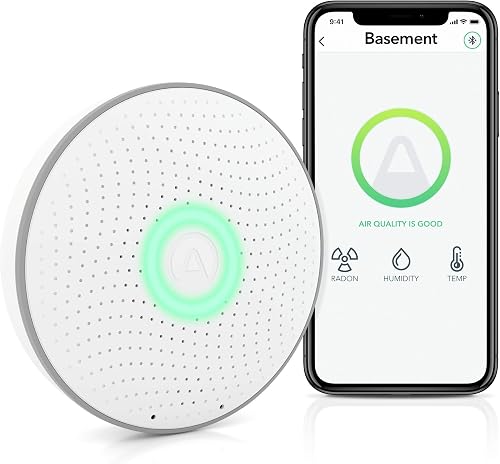
The Wave Radon uses Bluetooth to sync detailed results to the Airthings app when your phone is nearby. It also has a color-coded visual indicator on the device and measures humidity and temperature.
The Corentium Home 223 keeps the main readings on its screen. It shows daily, weekly and long-term averages, as well as short-term readings, and runs on 3 AAA batteries.
How do their displays and apps differ?
The X-Sense and Corentium Home 223 show numeric information on a screen, while the Wave Radon uses color at the device and detailed readings in its app. Pick the display you’re most likely to check regularly.
The X-Sense LCD shows current radon levels with arrows that indicate whether readings are rising, falling or stable. Its app adds history, notifications and file exports, which may suit you if you review readings away from home.
The Corentium Home 223 is a straightforward screen-first option. Its daily, weekly and long-term averages are visible on the device, so you don’t need a phone to check those readings.
The Wave Radon provides a quick color-coded visual indication: green, yellow or red. Detailed results are in the app, and Bluetooth syncing works when your phone is within range.
Which X-Sense vs Airthings app setup fits your routine?
Choose X-Sense if you want Wi-Fi access and notifications; choose the Wave Radon if nearby Bluetooth syncing fits your routine. Neither connection style is useful if you won’t keep the app set up or check its results.
X-Sense app access depends on a 2.4 GHz Wi-Fi connection. The app also helps interpret readings and can export records for trend review or professional consultation.
The Wave Radon connects to the Airthings app over Bluetooth when your phone is nearby. It can also connect to an Airthings Hub through Smartlink for data online 24/7.
The Corentium Home 223 has no app connectivity described here. Its screen makes it the simpler choice if you prefer to read averages directly on the detector.
Which detector makes it easier to track changes over time?
All 3 are designed for ongoing monitoring, but X-Sense specifies a history of up to 999 days and Airthings offers different reading views. Think about whether you want app history, on-device averages or both.
The XR0A-iR stores monitoring history even after you replace its batteries. That can help you compare longer-term patterns without repeatedly checking the device.
The Wave Radon app provides short- and long-term results, with daily, weekly, monthly and yearly measurements described for its app. The Corentium Home 223 displays daily, weekly and long-term averages directly on its screen.
Radon can vary with weather and other conditions, so avoid drawing a conclusion from one brief reading. Our guide to when radon levels are highest explains why timing and longer monitoring matter.
Which one works better if you want to compare rooms?
The X-Sense and Corentium Home 223 both support moving the detector between rooms, while the Wave Radon is also battery powered for flexible placement. Follow each device’s instructions and allow readings to build after a move.
For the XR0A-iR, move it to another room and press reset to start a new monitoring session. This lets you compare spaces with one device, though each session represents a different location and time.
The Corentium Home 223 is lightweight and battery powered, and its description says it can be moved between rooms. The Wave Radon is also battery powered, so placement doesn’t depend on an outlet.
For a less common location, read our guide on whether a radon detector can work in a crawl space. Placement and the device’s directions matter when comparing readings from different areas.
Does extra air data matter in a radon detector?
The Wave Radon is the only one of these 3 that also measures humidity and temperature. That extra context can be useful if you want those readings alongside radon, but it doesn’t replace a dedicated air quality monitor.
X-Sense also tracks temperature and humidity trends, according to its feature description. The Corentium Home 223 is a radon-only detector, so it keeps its measurements focused on that gas.
If you’re comparing radon with broader indoor air readings, our guide to air quality monitors that also measure radon explains the tradeoffs. A multi-sensor monitor may answer a different question than a dedicated radon detector.
What should you consider before choosing?
Choose around the way you’ll check results, the rooms you need to monitor and whether you want other indoor readings. A detector that matches your routine is easier to keep using over time.
If you want remote access, the X-Sense app’s Wi-Fi connection and notifications are its clearest distinction. Check that your home network supports 2.4 GHz Wi-Fi where you plan to use the detector.
If you want a device display, compare the X-Sense’s current level and trend arrows with the Corentium Home 223’s daily, weekly and long-term averages. The Wave Radon’s on-device signal is color-coded instead of numeric.
If you want humidity and temperature data, the Wave Radon measures both, and X-Sense tracks trends for both. The Corentium Home 223 keeps its focus on radon readings.
For more models and use cases, browse our home radon monitor guide. It can help you decide whether you want app access, a screen, portability or extra sensor readings.
Which X-Sense or Airthings radon detector is the better fit?
Pick X-Sense for Wi-Fi app alerts and history, the Wave Radon for app access with humidity and temperature, or the Corentium Home 223 for on-screen averages. Match the choice to the display and connection you’ll actually use.
The XR0A-iR has the most specified app tools here, including notifications, history and export options. Choose the Wave Radon if its color indicator and added humidity and temperature readings fit your needs.
Choose the Corentium Home 223 if you want to read averages directly from a portable screen. For more matchup details, compare the Airthings Wave Radon and Corentium Home.
Frequently asked questions
Is X-Sense or Airthings better for a radon detector?
X-Sense suits people who want Wi-Fi app notifications and a saved history, while Airthings offers different ways to check readings. The Wave Radon pairs with an app and gives a color-coded visual indication, and the Corentium Home 223 shows averages on its screen.
Choose by how you want to view results.
Does the X-Sense radon detector need Wi-Fi?
The X-Sense XR0A-iR connects to 2.4 GHz Wi-Fi for app access and notifications. Its LCD also shows current radon levels and trend arrows, so you can read the device directly; app features require the Wi-Fi connection.
Can the Airthings Wave Radon show readings on the device?
The Wave Radon gives a color-coded visual indication when you wave in front of it, while detailed results are available through the app. It syncs by Bluetooth when your phone is nearby, and Smartlink can connect it to an Airthings Hub for data online 24/7.
Which Airthings radon detector has an on-screen average?
The Corentium Home 223 displays daily, weekly and long-term radon averages on its LCD, along with short-term readings. The Wave Radon instead offers a color-coded visual indication at the device and detailed app results.
Should a home radon detector replace a professional test?
A home detector can help you follow readings over time, but a high or concerning result may call for a professional measurement or mitigation advice. Follow the device instructions and your local public health guidance; the EPA radon guide explains testing and next steps.


