Airthings Corentium Home 2 Radon Detector Review: Worth It? (October 2026)
The Airthings Corentium Home 2 suits people who want continuous radon readings on a portable, battery-powered device, with Bluetooth app graphs and temperature and humidity readings. Its screen shows short- and long-term averages, while remote monitoring requires a compatible Airthings Hub or View series monitor.
On this page (6 sections)
The Airthings Corentium Home 2 is a portable radon detector for people who want ongoing readings on both the device and an app. It runs on batteries, displays short- and long-term averages, and includes temperature and humidity sensors.
Its main advantage over the original Corentium Home is Bluetooth app access and the extra environmental readings. Consider the original if an on-screen view is enough, or the plug-in Ecosense EB100 if you want a fixed detector with a larger display.
The Airthings Corentium Home 2 at a glance
The Corentium Home 2 combines a built-in display with Bluetooth app graphs. You can check averages on the device or use the app to see how readings rise and fall over time.
Airthings Corentium Home 2: Best for app-linked portable monitoring

- Battery powered
- Bluetooth app connection
- Temperature and humidity sensors
- Short- and long-term averages
A portable detector with an on-device display, Bluetooth app graphs, and temperature and humidity readings. Choose it if you want both local readings and a way to review radon changes in the app.
Pros
- No outlet or installation needed
- Shows short- and long-term radon averages
- Includes temperature and humidity sensors
- App graphs show changes over time
Cons
- Remote monitoring requires a compatible Airthings Hub or View series monitor
- App access depends on pairing with a smartphone or tablet
It is battery powered and needs no installation, so you can place it in different parts of the house, including the basement. It also reads temperature and humidity, which gives you more context about the room while you monitor radon.
The display uses GOOD, FAIR, or POOR indicators for a quick view, alongside short- and long-term averages. For a closer look at changes over time, Airthings provides graphs and personalized tips through its app.
What the Corentium Home 2 review score means
Our 9.1 score reflects the fit between the detector's features and the needs of someone shopping for a portable, app-connected radon monitor. We weighed its on-device averages, Bluetooth graphs, battery power, and added temperature and humidity sensors against the limits of app-based remote access.
Our score weighs specs, features, and buyer feedback against what you're shopping for.
How does it compare with the original Corentium Home?
The Home 2 is the better fit if you want Bluetooth app graphs and temperature and humidity readings. The original Corentium Home model 223 is simpler, with daily, weekly, and long-term averages displayed on its LCD screen.
Airthings Corentium Home 223: Best for a simple screen-first option
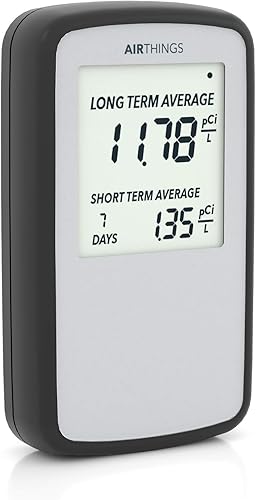
- Battery powered
- Daily, weekly, and long-term averages
- Portable between rooms
The original Corentium Home is a portable, battery-powered detector with readings on its LCD screen. It fits someone who wants radon averages without relying on an app.
Pros
- No outlet needed
- Displays daily, weekly, and long-term averages
- Can be moved between rooms
Cons
- Does not include the Home 2 Bluetooth and extra sensor features
- Uses AAA batteries rather than the Home 2's AA batteries
The original runs on 3 AAA batteries and can move between rooms without needing an outlet. Its screen-first setup may suit you if you prefer to check readings directly on the detector and don't need the Home 2's added sensors or Bluetooth connection.
The Home 2 uses 2 AA alkaline batteries. Both models are portable, but their battery types differ, so check which you keep on hand if that matters to your routine.
For a closer feature-by-feature look, see our Airthings Wave Radon vs Corentium Home comparison. It can help you decide whether an app-based Airthings detector or the Corentium's screen-centered design fits your room and monitoring habits.
Is the app useful for radon monitoring?
The app is useful if you want to review trends instead of relying only on a quick display reading. Its graphs show how radon changes over time, and Airthings says the app provides personalized tips for responding to levels in your home.
Bluetooth connects the detector with a smartphone or tablet. If you're away from home, remote monitoring and notifications require an Airthings Hub or View series monitor, so factor that extra device into your choice.
A phone connection also means you'll need to pair the detector and use the app to access its graphs. If you'd rather avoid that step, the original Corentium Home puts its averages directly on its LCD screen.
Radon readings can vary over time, so a single result may not describe a home's longer-term pattern. Our guide to how to choose a home radon monitor explains why the averaging periods and your intended use matter when comparing detectors.
Where can you place the detector?
The Corentium Home 2 can go where you need to monitor, including a basement, without an outlet or installation. Choose a location that represents the space you want to understand, and follow the manufacturer's placement instructions.
If you are checking a basement, think about how you use the space and where people spend time. Our guide to radon levels in basements covers why below-grade rooms are often part of a home's radon monitoring plan.
Moving a detector between rooms can help you compare locations, but it also changes what the device is measuring. Keep track of where it sits so you can interpret readings with the room in mind.
For a crawl space, confirm the placement conditions before relying on a reading. See whether a radon detector can work in a crawl space for practical questions about that setting.
What are the limits of the Corentium Home 2?
The main limitation is that remote access depends on an additional compatible Airthings device. Bluetooth app access is useful nearby, but the detector alone doesn't provide the 24/7 remote monitoring described for use with an Airthings Hub or View series monitor.
It is also a radon detector, not a broad air quality monitor. Its added temperature and humidity sensors do not mean it measures particles, carbon dioxide, or other gases.
The GOOD, FAIR, or POOR display indicators make a reading easier to scan, but they don't replace understanding the averages behind them. Use the short- and long-term readings for context, and consult qualified radon professionals if you need help interpreting results or choosing a response.
If you want to compare more devices before choosing, our best radon monitors for home use guide covers options for different monitoring preferences.
Should you choose the Corentium Home 2?
Choose the Airthings Corentium Home 2 if you want a portable detector with both on-device averages and Bluetooth app graphs. Its temperature and humidity sensors add room readings, while its battery-powered design lets you place it without an outlet.
Pick the original Corentium Home if you want a simpler screen-first detector with daily, weekly, and long-term averages. Choose the Ecosense EB100 if a plug-in monitor with a large display better suits a fixed room.
For the most direct alternative comparison, read Ecosense vs Airthings. If you mainly want an app-connected Airthings detector, compare the Wave Radon and Corentium Home before deciding.
Frequently asked questions
Does the Airthings Corentium Home 2 need Wi-Fi?
The Corentium Home 2 uses Bluetooth to connect with the Airthings app, so the detector itself doesn't need Wi-Fi for that connection. Remote monitoring while you're away requires pairing it with an Airthings Hub or View series monitor, which enables online data and notifications.
What does the Corentium Home 2 display show?
Its display shows short- and long-term radon averages alongside current environmental readings, with GOOD, FAIR, or POOR indicators. The Airthings app adds graphs that show how radon changes over time, which can help you compare readings across different periods.
Can you move the Airthings Corentium Home 2 between rooms?
Yes. The Corentium Home 2 is battery powered and needs no installation, so you can place it in different rooms, including a basement.
For useful comparisons, follow the placement guidance for your purpose and allow readings to reflect the room over time.
Is the Corentium Home 2 the same as the original Corentium Home?
No. Both are portable, battery-powered Airthings radon detectors, but the Home 2 adds Bluetooth connectivity, app graphs, and temperature and humidity sensors.
The original model 223 shows daily, weekly, and long-term radon averages on its LCD screen.


