8 Best Radon Monitors for Home (October 2026)
The best home radon monitors include the Airthings Corentium Home 2 for clear readings and app graphs, the Airthings View Plus for multiple air readings, and the Airthings Corentium Home 223 for simple on-screen averages.
On this page (5 sections)
The Airthings Corentium Home 2 is the best radon monitor for most homes, with a clear display, Bluetooth app graphs and portable battery-powered placement. Choose the Corentium Home 223 for simple on-screen averages, or View Plus if you also want readings for several other indoor air measures.
Radon levels change over time, so a monitor that tracks averages can help you see more than a single moment. For a plain explanation of placement and readings, start with our guide to choosing a home radon monitor.
Our picks at a glance
-
1

-
2

-
3
How we chose home radon monitors
We compared each model's stated readings, display, power and connection options against common home needs. Our score weighs specs and features against what you're shopping for.
A radon monitor should make it practical to keep checking over time. Some picks show readings on the device, while others add app graphs, WiFi access or measurements beyond radon.
| Product | Best for | Connection | Power | Extra readings | Our score |
|---|---|---|---|---|---|
| Airthings Corentium Home 2 | clear readings and app graphs | Bluetooth | 2 AA batteries | Temperature and humidity | 9.1 |
| Airthings View Plus | multiple air readings | WiFi and app | 6 AA batteries or USB-C cable | 9.0 | |
| Airthings Corentium Home 223 | simple on-screen averages | 3 AAA batteries | 8.9 | ||
| Airthings Wave Radon | color-coded checks | Bluetooth; Hub for 24/7 online data | Battery powered | 8.6 | |
| Airthings Wave Plus | radon plus CO2 and VOCs | Bluetooth; Hub for online dashboard | 2 AA batteries | 8.5 | |
| Ecosense EB100 Radon Detector | a large plug-in display | Corded electric | 8.3 | ||
| Airthings View Radon | WiFi alerts and a built-in display | WiFi and app | 6 AA batteries or USB cable | 8.2 | |
| Ecosense EF100 Radon Detector | portable placement without WiFi | Bluetooth app; works offline | Battery powered | 8.1 |
The best radon monitors for home use
The best fit depends on whether you want simple readings, remote access or a broader view of indoor air. These picks are ordered by score, with each aimed at a different setup.
Airthings Corentium Home 2: Best for clear readings and app graphs
- Bluetooth app graphs
- Short- and long-term averages
- Temperature and humidity readings
- Battery powered
A portable radon detector with on-screen averages and Bluetooth graphs for tracking changes over time. Temperature and humidity readings add context in the same room.
Pros
- Shows short- and long-term radon averages
- Bluetooth graphs and personalized tips
- No installation needed
Cons
- Remote monitoring requires an Airthings Hub or View series monitor
Corentium Home 2 is the strongest all-around choice for a home radon monitor because it combines on-screen short- and long-term averages with Bluetooth graphs. The display also shows temperature and humidity readings, so you can see those conditions alongside radon.
Its battery-powered design needs no installation and can be placed in different rooms, including a basement. The app graphs show how readings rise and fall, and Airthings provides personalized tips based on home levels.
Choose it if you want both a local display and app details. Remote monitoring and notifications away from home require pairing with an Airthings Hub or View series monitor.
Airthings View Plus: Best for multiple air readings
- Measures radon, PM2.5, CO2 and VOCs
- Also measures humidity, temperature and air pressure
- WiFi-connected app
- Customizable eInk screen
View Plus combines radon monitoring with six other indoor air readings and WiFi-connected app access. Choose it when broader air tracking matters as much as radon.
Pros
- Seven air quality sensors
- Customizable eInk screen
- Battery powered
Cons
- Requires the Airthings app, an account and internet access
View Plus is the broadest air monitor in this group, measuring radon alongside PM2.5, CO2, VOCs, humidity, temperature and air pressure. Its customizable eInk screen can show selected readings, while the app provides current values, trends and notifications.
The WiFi-connected, battery-powered design suits a shared room where you want to track more than radon. It requires the Airthings app, an account and internet access, so choose a simpler standalone display if you prefer to avoid those dependencies.
See our guide to air quality monitors that also measure radon for more options that combine readings.
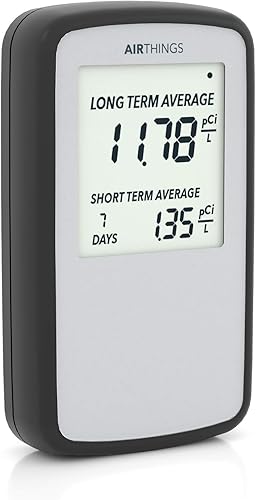
Airthings Corentium Home 223: Best for simple on-screen averages
- Daily, weekly and long-term averages
- Battery operated
- Portable between rooms
- Radon self-inspection report
The original Corentium Home shows short- and long-term readings on its screen without relying on an app. Its small, battery-powered form is easy to move between rooms.
Pros
- Clear average readings on screen
- No outlet required
- Portable between rooms
Cons
- No app connection is specified
The Corentium Home 223 keeps the focus on readings shown directly on the screen. It displays daily, weekly and long-term averages, runs on 3 AAA batteries and can move between rooms without an outlet.
Choose it if an app is not important and you want a straightforward digital display. The available details do not specify app connectivity, so buyers who want phone graphs or remote alerts should consider a connected model instead.
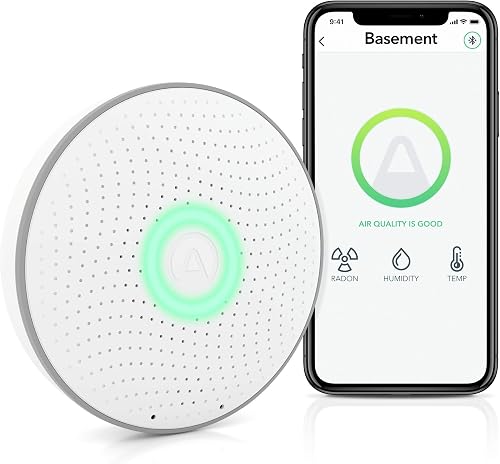
Airthings Wave Radon: Best for color-coded checks
- Radon, humidity and temperature readings
- Color-coded visual indication
- Bluetooth app results
- Battery powered
Wave Radon gives a color-coded visual indication and detailed app results over Bluetooth. It also tracks humidity and temperature.
Pros
- Visual color-coded check
- Short- and long-term results in the app
- Battery powered
Cons
- 24/7 online data requires an Airthings Hub
Wave Radon suits someone who wants a quick visual check and app access. Wave in front of the monitor for a color-coded indication, or connect by Bluetooth to review short- and long-term radon results and trends.
It also measures humidity and temperature, and its battery-powered design makes placement flexible. For data online around the clock, Airthings says the device can connect to an Airthings Hub.
Airthings Wave Plus: Best for radon plus CO2 and VOCs

- Measures radon, CO2 and VOCs
- Also measures humidity, temperature and air pressure
- Color-coded visual indication
- Bluetooth app
Wave Plus combines radon readings with five other indoor air measures. Choose it when CO2 and VOC tracking matter, and you want a color-coded check as well as app details.
Pros
- Six indoor air readings
- Color-coded visual indication
- Battery powered
Cons
- Online dashboard requires an Airthings Hub
Wave Plus adds CO2 and VOC readings to radon, humidity, temperature and air pressure. Its color-coded visual indication offers a quick check, while the Bluetooth app provides more detail.
Choose it when you want several indoor air measures in one battery-powered device. The online dashboard requires an Airthings Hub, so check that connection need if remote access matters to you.
Ecosense EB100 Radon Detector: Best for a large plug-in display

- First reading in 10 minutes
- Real-time, daily, weekly, monthly and long-term averages
- Full-size digital display
- No smartphone required
EB100 keeps readings on a full-size display, including real-time and long-term averages. It is a plug-in option for a fixed spot where an outlet is available.
Pros
- No smartphone required
- Full-size digital display
- Multiple averaging periods
Cons
- Requires an outlet for best performance
EB100 is a plug-in option for a fixed monitoring spot, with a full-size digital display and no smartphone required. It shows real-time, daily, weekly, monthly and long-term average levels, and Ecosense says the first reading appears in 10 minutes.
Its corded power makes outlet access part of the placement decision. Choose it when a large, always-visible display matters more than moving the monitor around the house.
Airthings View Radon: Best for WiFi alerts and a built-in display

- WiFi-connected app and dashboard
- Built-in customizable eInk display
- Measures radon, humidity and temperature
- Battery or USB power
View Radon pairs a built-in display with WiFi-connected app and dashboard access. It also measures humidity and temperature.
Pros
- Built-in customizable display
- App graphs, notifications and insights
- Can act as a hub for other Airthings devices
Cons
- WiFi access depends on a connected network
View Radon combines WiFi-connected app access with a built-in eInk display. It measures radon, humidity and temperature, and the display can show up to four values.
The monitor can run on batteries or USB power and connects to an app and online dashboard with graphs and notifications. It can also act as a hub for other Airthings devices, which may suit a home already using that system.
Ecosense EF100 Radon Detector: Best for portable placement without WiFi

- Battery powered and portable
- Always-on display
- Bluetooth app for saved data and charts
- Short- and long-term monitoring
EF100 is a portable, battery-powered monitor with an always-on display and Bluetooth app charts. It can run offline as a standalone device.
Pros
- No outlet needed
- Always-on display
- App supports room-by-room comparisons
Cons
- Detailed app access requires Bluetooth connection
EF100 is the portable pick for a home where outlets are inconvenient. Its battery-powered design and always-on display show current levels, averages and historical highs and lows; Bluetooth adds saved data and charts in the app.
Ecosense says it works offline as a standalone device, with Bluetooth needed for app access. Choose it for room-to-room placement and app history without relying on WiFi.
What should you compare before choosing a radon monitor?
Compare how each monitor displays readings, how it is powered and whether its app needs Bluetooth, WiFi or a separate hub. Those differences affect where you can place it and how easily you can check changes.
Does the display show averages or only a current reading?
Averages make it easier to follow radon over time. Corentium Home 2 shows short- and long-term averages, while Corentium Home 223 displays daily, weekly and long-term averages.
If you want live values and historical highs and lows on the device, EF100 lists those readings for its always-on display. Match the display to how often you want to check the monitor directly.
Is a phone app or remote access important?
Bluetooth models can sync with a phone when you're nearby, while WiFi-connected models add access through an app or dashboard. View Plus requires internet access and an account, and Wave Radon needs an Airthings Hub for 24/7 online data.
If you want a monitor that can run without WiFi, EF100 works offline as a standalone device. Read our Airthings Corentium Home 2 review for a closer look at the top pick's display and app features.
Will the monitor fit the room where you need it?
Battery-powered monitors are easier to place where an outlet is not available. A corded EB100 needs an outlet, while Corentium Home 2, Wave Radon and EF100 are described as battery powered.
Think about the room, power access and whether you plan to move the device. Our article on radon detectors in crawl spaces covers a more specific placement question.
Are radon monitors a replacement for a radon test?
A home monitor is useful for ongoing readings, but follow local guidance and device instructions when you need a formal test. If readings concern you, consult a qualified radon professional about next steps and mitigation.
Radon levels can vary by time and location, which is why a continuing record can be helpful. For a model-by-model comparison, see Airthings Wave Radon vs Corentium Home.
Which home radon monitor should you choose?
Choose Corentium Home 2 if you want a portable display, averages and Bluetooth graphs in one device. Pick View Plus for a wider set of air readings, Corentium Home 223 for simple screen-based averages, or EF100 when battery power and offline use are priorities.
For the main decision, compare the kind of readings you want with the room's power and connection options. The guide to choosing a home radon monitor can help you narrow the placement and monitoring questions.
Our top 3 picks at a glance
-
1
-
2
-
3
Frequently asked questions
How long should you monitor radon at home?
Use long-term monitoring to understand changing radon levels over time. Radon varies by day and season, so a short reading alone may not reflect longer exposure.
Keep the monitor in the location recommended by its instructions, and use a qualified radon professional for questions about testing or mitigation.
Can you move a home radon monitor between rooms?
Yes, portable battery-powered models such as Corentium Home 2 and Corentium Home 223 can be moved between rooms. Keep track of where each reading was taken because levels can vary from room to room.
Follow the device instructions when relocating it and allow for any settling period it specifies.
Should a radon monitor go in the basement?
A basement can be a useful place to monitor, especially if it is regularly occupied or is the lowest lived-in level. Placement instructions vary by device, so follow the manual and avoid moving the monitor repeatedly while comparing readings.
Our guide to radon levels in basements explains why readings may differ by floor.
Do radon monitors need WiFi?
No. Several monitors can show readings without WiFi, including battery-powered displays and models that sync by Bluetooth.
WiFi is useful for viewing readings remotely or getting connected app features.
Check the specific model's connection needs: some app functions require an account, internet access or a separate hub.


