8 Best Air Quality Monitors for 3D Printing (November 2026)
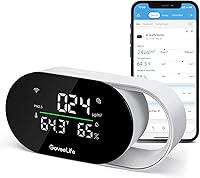
The best air quality monitors for a home 3D printing space include the GoveeLife Smart Air Quality Monitor with PM2.5 for logging print room readings, the Heouakc 10-in-1 Air Quality Monitor Indoor for moving between rooms, and the LifeBasis Air Quality Monitor Indoor for sound and color alerts.
On this page (9 sections)
- The best air quality monitors for a home printing space
- How these air quality monitors compare
- How we compared these monitors for 3D printing
- What should a 3D printing air monitor measure?
- Should you pick a screen model or an app model?
- Where should you place a monitor in a print room?
- Do you need smart control with a 3D printing monitor?
- What else helps keep a print room's air clean?
- The best air quality monitor for 3D printing: which should you buy?
The best air quality monitor for 3D printing is the GoveeLife Smart Air Quality Monitor with PM2.5, because it refreshes PM2.5 every 2 seconds and stores up to 2 years of data for export. That history lets you compare a print day with a quiet week and see whether your ventilation is actually working.
A printer is a small source of particles and fumes in one room. A monitor won't remove either, but it turns an invisible change into a number you can act on.
If you print in a spare bedroom, a basement or a garage corner, the readings matter more than the badge on the box. The picks below cover screen-first units, app units and battery models for a room that changes use.
Our picks at a glance
-
1
 Best for logging print room readings
GoveeLife Smart Air Quality Monitor with PM2.5
9.7/10 our score
See it on Amazon -
2
 Best for moving between rooms
Heouakc 10-in-1 Air Quality Monitor Indoor
9.4/10 our score
See it on Amazon -
3
 Best for sound and color alerts
LifeBasis Air Quality Monitor Indoor
8.7/10 our score
See it on Amazon
- 4
 Check it
Amazon Smart Air Quality Monitor
Best for Alexa households - 5
 Check it
Fil-Fresh 16 in 1 Air Quality Monitor
Best for a large readable display - 6
 Check it
AQItech 16-in-1 Indoor Air Quality Monitor
Best for simple one-button use - 7
 Best for reviewing past print sessionsCheck it
- 8
 Check it
16-in-1 Air Quality Monitor with 7-Inch Screen
Best for a tight budget
The best air quality monitors for a home printing space
The GoveeLife H5106 is the strongest pick for most print rooms, and each other model solves a narrower need. Choose by how you want to read the numbers and whether you need history or alerts.
GoveeLife Smart Air Quality Monitor with PM2.5: Best for logging print room readings
- PM2.5, temperature and humidity readings
- 2-second refresh
- 13-day online graphs and 2-year data export
- Links to GoveeLife purifiers and fans
It follows particle changes during a print and keeps the history, so you can compare a print day with a quiet week.
Pros
- 2-second PM2.5 refresh
- 2 years of stored data to export
- Automates GoveeLife purifiers and fans
Cons
- Needs a power outlet at all times
- No CO2 or VOC sensor
The GoveeLife H5106 suits someone who wants to know what a print did to the air after it finishes. It tracks PM2.5, temperature and humidity, and refreshes those readings every 2 seconds.
Two years of stored data is the standout feature. You can view 13-day graphs online and export the rest, which makes it easy to compare a week of printing with a week off.
GoveeLife says PM2.5 accuracy is ±15 µg/m³ from 0 to 100 µg/m³. Treat the number as a trend line rather than a lab result.
It also links to GoveeLife purifiers, humidifiers and fans, so a rising reading can switch on a purifier without you touching a phone. The unit needs a power outlet and has no battery.
Heouakc 10-in-1 Air Quality Monitor Indoor: Best for moving between rooms
- PM0.3, PM2.5, PM10, CO2, CO, HCHO, TVOC and AQI
- Color-coded levels
- 1.2-second sampling
- 2000mAh battery with USB-C
It reads particles, gases and CO2 together on one screen and runs on battery, so it suits a workspace you also use for other things.
Pros
- Wide sensor set including CO2 and TVOC
- Fast 1.2-second sampling
- Runs up to 96 hours on battery
Cons
- Screen shows levels rather than long-term graphs
- No app or smart-home link
Heouakc's 10-in-1 unit covers the widest set of readings here, including PM0.3, PM2.5, PM10, CO2, CO, HCHO and TVOC. For a print room, the PM and TVOC figures are the ones that change when filament heats up.
It samples every 1.2 seconds and turns the results into color-coded levels from Good to Serious. A quick glance tells you more than reading six separate numbers.
The 2000mAh battery runs up to 96 hours, so you can carry it from the printer to the bedroom and back. That matters if the print room is also a living space.
There's no app or smart-home link. The screen and the audible alarm are the whole interface, which keeps setup to a single button.
LifeBasis Air Quality Monitor Indoor: Best for sound and color alerts
- 11 indexes including AQI, CO2, PM1.0, PM2.5, PM10, HCHO and TVOC
- NDIR CO2 sensor
- Color and ticking alerts
- 2500mAh battery
The ticking alarm and changing screen colors make a rising reading hard to ignore while a print runs in the background.
Pros
- Four alert levels with sound and color
- NDIR CO2 sensor
- Up to 12 hours on battery
Cons
- No app, graphs or data export
- Alert sound cannot be scheduled
LifeBasis suits a household that wants a warning it can hear. When a reading passes the normal level, the unit ticks, the light flashes and the screen color shifts through green, yellow, orange and red.
It measures 11 indexes, including PM1.0, PM2.5, PM10, CO2, HCHO and TVOC. The CO2 sensor is NDIR infrared, which measures the gas directly rather than estimating it.
A 2500mAh battery gives up to 12 hours of use, enough for a long print session away from an outlet. The LCD brightness adjusts so it doesn't glare in a dark room.
The trade-off is the missing app. You get live numbers and alerts, but no graphs or export, so the LifeBasis is for people who watch the screen rather than review history later.
Amazon Smart Air Quality Monitor: Best for Alexa households
- PM2.5, VOCs, carbon monoxide, humidity and temperature
- Color-coded LED and Alexa app score
- Phone and Echo alerts
- Alexa Routines
It turns a bad reading into a phone notification or an Echo announcement and can switch on a compatible purifier or fan.
Pros
- VOC and CO sensors alongside PM2.5
- Alerts on phone and Echo devices
- Routines control Alexa devices
Cons
- Requires an Alexa setup
- No display beyond a color LED
The Amazon Smart Air Quality Monitor suits a home already built around Alexa. It tracks PM2.5, VOCs, carbon monoxide, humidity and temperature, then shows a color LED and an air quality score in the Alexa app.
Phone notifications and Echo announcements are its main draw. If particle levels climb while you're in another room, Alexa tells you instead of waiting for you to check a screen.
Routines let it switch compatible purifiers, dehumidifiers and fans on when readings change. That closes the loop between detecting a problem and fixing it.
There's no numeric display on the unit itself, just the LED. Everything else lives in the app, so it's the least useful pick if you want to read numbers at a glance while standing at the printer.
Fil-Fresh 16 in 1 Air Quality Monitor: Best for a large readable display
- CO2, PM2.5, PM1.0, PM10, HCHO, TVOC, temperature and humidity
- 7.2-inch LED screen
- 1 to 2 second updates
- 2500mAh battery
The oversized screen lets you read particle and gas levels from across the room without an app.
Pros
- 7.2-inch screen with 3 brightness levels
- Fast 1 to 2 second updates
- No app or Wi-Fi needed
Cons
- 8 hours of battery per charge
- Meant for general monitoring rather than lab-grade checks
Fil-Fresh puts its readings on a 7.2-inch LED screen with oversized text, so you can read particle and gas levels from across the room. It covers CO2, PM1.0, PM2.5, PM10, HCHO, TVOC, temperature and humidity.
Updates arrive every 1 to 2 seconds. The screen has three brightness levels, which helps in a dim basement or a bright garage.
There's no app, Wi-Fi or account to set up. Power it on and the numbers appear, which makes it the easiest unit here to hand to someone who just wants to know if the air is okay.
The 2500mAh battery gives about 8 hours per charge. Fil-Fresh also says the readings suit general monitoring rather than medical or lab-grade checks.
AQItech 16-in-1 Indoor Air Quality Monitor: Best for simple one-button use
- PM1.0, PM2.5, PM10, CO2, TVOC, HCHO, temperature and humidity
- 1.5-second sampling
- HD color screen
- 4 to 5 hours on battery
One button runs it and a double tap silences the alert, which keeps setup short in a shared room.
Pros
- Single-button control
- Color-coded readings on a HD screen
- Quiet sampling mode for night use
Cons
- 4 to 5 hours per charge
- No app or history
AQItech's unit is the simplest to operate here. One button turns it on and switches between Celsius and Fahrenheit, and a double tap silences the audio prompt.
It tracks PM1.0, PM2.5, PM10, CO2, TVOC, HCHO, temperature and humidity, sampling every 1.5 seconds. The HD color screen color-codes the levels so a quick look is enough.
A quiet sampling mode helps if the printer sits in a bedroom or a shared office. A full charge gives 4 to 5 hours of use, and the Type-C port works with common phone cables.
The external temperature and humidity sensor shouldn't be touched during use. Keep it clear of alcohol, perfume and strong airflow, or the readings will drift.
BREATHE Airmonitor Plus Gen 2: Best for reviewing past print sessions
- CO2, PM1, PM2.5, PM10, TVOC, HCHO, temperature and humidity
- NDIR CO2 sensor
- 90-day app history and CSV export
- 6-hour battery
It stores 90 days of readings in an app and exports them, so you can look back at what a long print did to the air.
Pros
- 90-day history with CSV export
- Configurable CO2 and PM2.5 alerts
- Works while plugged in or on battery
Cons
- Needs 2.4 GHz Wi-Fi and the app for history
- 6 hours per charge
BREATHE's Airmonitor Plus Gen 2 is for the printer who wants a record, not just a snapshot. It measures CO2, PM1, PM2.5, PM10, TVOC, HCHO, temperature and humidity, with an NDIR CO2 sensor doing the carbon dioxide work.
Ninety days of app history and CSV export set it apart. You can look back at a long print and see when particle and gas levels rose and how long they took to settle.
Alerts for CO2 and PM2.5 are configurable in the app. The 6-hour battery covers a print session, and USB-C power keeps it running for longer jobs.
The app and 2.4 GHz Wi-Fi are required for history and alerts. If you don't want another app on your phone, one of the screen-first models above is the better fit.
16-in-1 Air Quality Monitor with 7-Inch Screen: Best for a tight budget
- CO2, PM2.5, PM1.0, PM10, HCHO, TVOC, temperature and humidity
- 7-inch LED screen
- 7 AQI alert buzzers
- 8 hours on battery
It puts a large screen and several gas readings in one low-cost unit, with simple alerts and no app.
Pros
- 7-inch screen with 3 brightness settings
- Up to 8 hours on battery
- Mute button for the alerts
Cons
- External sensors are easy to disturb
- No app, graphs or history
This YNAK unit is the budget route to a big screen. It offers a 7-inch LED display with three brightness settings and tracks CO2, PM1.0, PM2.5, PM10, HCHO, TVOC, temperature and humidity.
It runs up to 8 hours on a full charge and includes an AC adapter for continuous use. Seven alert buzzers cover different pollutants, and a mute button silences them.
The external high-precision sensors are the weak point in daily use. Touching them or exposing them to perfume or strong odors throws off the readings, so place the unit where nothing brushes the sensor area.
It's the lowest-scoring pick here for a print room because it adds no app, history or smart link. It suits someone who wants a cheap live readout and nothing more.
How these air quality monitors compare
Every model here reads particles. The real differences are which gases they add, how you see the numbers, and whether the data is saved.
| Product | Best for | Measures | Refresh | Power | Our score |
|---|---|---|---|---|---|
| GoveeLife Smart Air Quality Monitor with PM2.5 | logging print room readings | PM2.5, temperature, humidity | 2 seconds | Wired, Type-C, no battery | 9.7 |
| Heouakc 10-in-1 Air Quality Monitor Indoor | moving between rooms | PM0.3/2.5/10, CO2, CO, HCHO, TVOC, AQI, temp, humidity | 1.2 seconds | 2000mAh battery, USB-C | 9.4 |
| LifeBasis Air Quality Monitor Indoor | sound and color alerts | AQI, CO2, PM1.0/2.5/10, HCHO, TVOC, temp, humidity | 2500mAh battery, Type-C | 8.7 | |
| Amazon Smart Air Quality Monitor | Alexa households | PM2.5, VOCs, CO, humidity, temperature | Plug-in | 8.4 | |
| Fil-Fresh 16 in 1 Air Quality Monitor | a large readable display | CO2, PM1.0/2.5/10, HCHO, TVOC, temp, humidity | 2500mAh battery, USB-C | 8.3 | |
| AQItech 16-in-1 Indoor Air Quality Monitor | simple one-button use | PM1.0/2.5/10, CO2, TVOC, HCHO, temp, humidity | 1.5 seconds | Rechargeable, Type-C | 8.2 |
| BREATHE Airmonitor Plus Gen 2 | reviewing past print sessions | CO2, PM1/2.5/10, TVOC, HCHO, temp, humidity | 6-hour battery, USB-C | 7.9 | |
| 16-in-1 Air Quality Monitor with 7-Inch Screen | a tight budget | CO2, PM1.0/2.5/10, HCHO, TVOC, temp, humidity | 8-hour battery, USB-C | 6.9 |
The GoveeLife H5106 wins on history and automation, and the Heouakc wins on sensor breadth and battery life. The Amazon unit wins on alerts, while the BREATHE wins on app-side analysis.
Screen size separates the Fil-Fresh and YNAK units from the rest. Both use a 7-inch display, but the Fil-Fresh costs more and the YNAK's external sensors need more care.
If you only glance at readings while a print runs, a screen model is enough. If you want to prove a ventilation change worked, choose one with stored data.
How we compared these monitors for 3D printing
We checked the specs and features each brand publishes and scored them against what a home print room needs. Sensors for PM2.5 and TVOC carried the most weight, followed by refresh speed, history and alerts.
Our score weighs specs, features and buyer feedback against what you're shopping for. A wide sensor set counts for more than a large screen when the goal is catching a printer's output.
We also weighed practical points: whether the unit needs an outlet or a battery, whether it works without an app, and whether it can control a purifier. Those decide how well a monitor fits a room that isn't only a workshop.
If you want the background on how these devices turn air into numbers, our guide to how air quality monitors work explains the sensors. For the accuracy question, see how accurate home air quality monitors are.
What should a 3D printing air monitor measure?
A 3D printing monitor should measure PM2.5 and TVOC at minimum, because those catch the particles and fumes a printer releases. CO2 and CO are useful extras if the room is small or closed.
PM2.5 is the particle size most often linked to printer emissions. A sensor that also reads PM1.0 and PM10 gives you a fuller picture of what's floating in the room.
TVOC covers a broad group of chemical vapors. HCHO (formaldehyde) is a specific gas some units add, and it matters if you print near furnishings or paints that also off-gas.
CO2 isn't a printer emission, but a closed room with a running machine and no fresh air will show it climbing. That reading tells you when to open a window.
Do you need CO2 for a print room?
CO2 is optional but useful. A printer doesn't produce much carbon dioxide, yet a sealed room with the door shut will build it up from your own breathing.
If the monitor shows CO2 rising while you work, ventilation is the fix. The Heouakc, LifeBasis, Fil-Fresh, AQItech and BREATHE units all report CO2.
Which gases matter most near a printer?
TVOC matters more than CO2 near a printer. Fumes from heated filament show up as volatile organic compounds, and a monitor with a TVOC sensor reacts to that.
PM2.5 runs alongside it, since the same print gives off both particles and vapors. A unit with both sensors covers the two main concerns.
Should you pick a screen model or an app model?
Pick a screen model if you want to read the air at a glance while you work. Pick an app model if you print while you're in other rooms and want alerts and history.
Screen models like the Fil-Fresh, AQItech and YNAK units need no setup. You power them on and the numbers appear, which suits a quick check before and after a print.
App models like the GoveeLife, Amazon and BREATHE units store data and push alerts. They also cost more attention: you need Wi-Fi, a phone and an account.
When an app is worth it
An app earns its place when prints run long. A 12-hour print in an empty room is exactly when a phone alert helps, and when history shows what happened overnight.
The GoveeLife H5106 goes further by linking to GoveeLife purifiers and fans. If you already own those, the monitor can trigger them when readings rise.
If you'd rather keep your phone out of it, the screen models do the core job. Our roundup of the best air quality monitors for home covers units built for living rooms rather than workspaces.
Where should you place a monitor in a print room?
Place the monitor near the printer but out of direct airflow, at the height where you sit or stand. A spot on the same desk as the machine catches changes faster than a shelf across the room.
Avoid the exhaust path of a fan or vent. Strong airflow pushes air past the sensor and can make readings jump before the room has really changed.
Keep the sensor area clear. AQItech and YNAK both warn that touching the sensor or exposing it to perfume and strong odors skews the numbers.
Should you run the monitor during a print or after it?
Run it during the print. That's when particles and fumes peak, and a live reading tells you whether the room needs a window open.
Keep it on after the print too. Particle counts often fall faster than gas readings, so a monitor with TVOC or HCHO sensors shows when the air has really cleared.
The GoveeLife's 13-day graphs are handy here. You can see the peak during a print and how long the room took to return to its baseline.
Do you need smart control with a 3D printing monitor?
Smart control is a bonus, not a requirement. It helps if you already own a purifier or fan on the same platform as the monitor.
The GoveeLife H5106 works with listed GoveeLife purifiers, humidifiers and fans. Set a target and the purifier switches on when readings cross it.
The Amazon monitor uses Alexa Routines to control compatible devices. It also announces poor air quality on Echo speakers, which is useful in a room you pass through.
Other models here have no smart link. A monitor without automation still tells you when to switch a purifier on yourself.
Our roundup of smart air quality monitors with an app covers app-led units in more depth.
What should you check before buying a smart monitor?
Check the platform first. A GoveeLife monitor only automates GoveeLife devices, and an Amazon monitor needs Alexa and compatible gear.
Then check the Wi-Fi band. The GoveeLife H5106 and the BREATHE both use 2.4 GHz Wi-Fi, not 5 GHz, so confirm your network offers it.
If you don't own any smart devices yet, a screen model costs less and skips the setup.
What else helps keep a print room's air clean?
A monitor tells you what's happening, but ventilation and filtration do the cleaning. An open window, an exhaust fan or a purifier with a HEPA and carbon filter does more than any reading.
Run the printer near a window or under an extractor if you can. A small room with the door shut traps both particles and fumes, and the monitor will show it.
Let the readings guide your habits. If PM2.5 spikes every time you print ABS, move that job to a better-ventilated spot or switch filament.
When should you move the printer instead of adding gear?
Move the printer when the monitor shows repeated spikes in a room you sleep or eat in. No filter fixes a small bedroom shared with a printer as well as a different location does.
A garage, a utility room or a spare corner with a window is a better home for the machine. Keep the monitor in that room so you still know what the air is doing.
For a broader look at picking a unit, our home air quality monitor roundup covers living-space models. This post's picks stay focused on the print room.
The best air quality monitor for 3D printing: which should you buy?
For most print rooms, buy the GoveeLife Smart Air Quality Monitor with PM2.5. The 2-second PM2.5 refresh and 2 years of exportable data make it the best air quality monitor for 3D printing when you want to track a room over time.
Pick the Heouakc 10-in-1 instead if you want CO2 and TVOC in the same unit and a battery that lasts up to 96 hours. Choose the Amazon Smart Air Quality Monitor if Alexa already runs your home and you want phone alerts.
The LifeBasis suits anyone who wants a loud, visible alert. For app history and CSV export, the BREATHE Airmonitor Plus Gen 2 is the pick.
On a tight budget, the YNAK 16-in-1 gives you a big screen and live readings for the least money.
Whichever you choose, put it beside the printer and keep a window or purifier in the plan. The monitor shows the problem; the airflow fixes it.
Our top 3 picks at a glance
-
1
Best for logging print room readings
GoveeLife Smart Air Quality Monitor with PM2.5
9.7/10 our score
See it on Amazon -
2
Best for moving between rooms
Heouakc 10-in-1 Air Quality Monitor Indoor
9.4/10 our score
See it on Amazon -
3
Best for sound and color alerts
LifeBasis Air Quality Monitor Indoor
8.7/10 our score
See it on Amazon
Frequently asked questions
What does a 3D printer release into the air?
FDM printers release ultrafine particles and volatile organic compounds while extruding plastic. Both show up as PM2.5 and TVOC readings on a monitor, so a unit that tracks those two measures covers the main concern.
Where should I put the monitor in a print room?
Place it near the printer but out of the direct airflow of a fan or vent, at about the height where you sit or stand. A spot beside the machine catches changes faster than a shelf across the room.
Do I need a monitor with an app for 3D printing?
Not always. A screen model tells you what the air is doing right now.
An app model adds history and phone alerts, which help when a long print runs while you are in another room.
Will a monitor turn on my air purifier?
Only if both use the same smart platform. The GoveeLife H5106 links to listed GoveeLife purifiers and fans, and the Amazon monitor uses Alexa Routines with compatible devices.
Other models here do not control anything.
Is PM2.5 or VOC more important for a 3D printing space?
Watch both. PM2.5 catches the particles a printer gives off, while TVOC catches the chemical fumes.
A monitor with only PM2.5 still shows when particle levels climb during a print.
How long should I run a monitor after a print finishes?
Keep it on until readings fall back toward the levels you saw before the print started. Particle counts often drop faster than gas readings, so let the numbers guide you rather than a fixed timer.