9 Best Air Quality Monitors for Home Assistant (November 2026)
The best Home Assistant air quality monitors include the GoveeLife Smart Air Quality Monitor with PM2.5 for PM2.5 and humidity tracking, the SONOFF AirGuard CO2 SAWF-08P for Home Assistant integration, and the Aranet4 CO2 Monitor for cable-free placement.
On this page (8 sections)
- The best air quality monitors for Home Assistant
- How the monitors compare
- How these were compared
- Which connection method should you choose for a Home Assistant monitor?
- Do you need CO2, PM2.5 or VOC sensing?
- Should you pick a monitor with a battery or a screen?
- What else should you check before you buy?
- Which air quality monitor should you add to Home Assistant?
The best air quality monitor for Home Assistant is the SONOFF AirGuard CO2 SAWF-08P, the one model here that supports Matter and lists Home Assistant as a platform it joins. It measures CO2, temperature and humidity with an NDIR sensor and updates every 5 seconds.
For PM2.5 tracking with a fast refresh, the GoveeLife H5106 is the pick, though it stays inside the Govee Home app.
Home Assistant is an open smart home platform, so the monitor you choose matters less for its screen and more for how it talks to the rest of your system. A monitor that joins through Matter or a local integration can drive fans, vents and alerts without a separate app running on your phone.
One that lives in a brand app gives you readings and history but keeps automation inside that brand's ecosystem.
A sensor that reports CO2 as an entity in Home Assistant is only useful if the number is trustworthy and arrives quickly enough for an automation to act. A particle sensor that updates every 2 seconds can catch a cooking spike while a 5-second CO2 reading is plenty for deciding when to crack a window.
This list covers the monitors we'd actually plug into a Home Assistant home, ordered by overall score. If you're still deciding what to measure, our guide to the best air quality monitor for home covers the wider market, and how air quality monitors work explains what each sensor actually reports.
Our picks at a glance
-
1
 Best for PM2.5 and humidity tracking
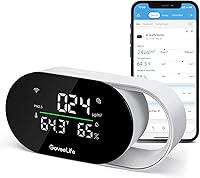
GoveeLife Smart Air Quality Monitor with PM2.5
9.7/10 our score
See it on Amazon -
2

-
3

- 4
 Check it
Amazon Smart Air Quality Monitor
Best for Alexa households - 5
 Check it
AQItech 16-in-1 Indoor Air Quality Monitor
Best for many readings on one screen - 6
 Best for CO2 alerts in a nurseryCheck it
- 7
 Best for formaldehyde and TVOC checksCheck it
- 8
 Best for long battery lifeCheck it
- 9
 Check it
16-in-1 Air Quality Monitor with 7-Inch Screen
Best for reading from across the room
The best air quality monitors for Home Assistant
SONOFF takes the top spot for integration, and the rest of the list covers specific jobs: PM2.5, portability, many sensors on one screen, nursery CO2 and long battery life. Match the monitor to the sensor you care about before comparing menus or displays.
GoveeLife Smart Air Quality Monitor with PM2.5: Best for PM2.5 and humidity tracking
- PM2.5, temperature and humidity
- 2-second refresh
- 2.4 GHz Wi-Fi and Bluetooth
- 13-day online graphs, 2-year export
A low-cost indoor monitor that tracks particles, temperature and humidity with a fast refresh. The Govee Home app holds the history and links to GoveeLife purifiers.
Pros
- Fast 2-second data refresh
- Records and exports up to 2 years of data
- Links to GoveeLife purifiers, humidifiers and fans
Cons
- No CO2 sensor
- Needs 2.4 GHz Wi-Fi, not 5 GHz
- No built-in battery
The GoveeLife H5106 is the best all-round indoor monitor here for particle tracking. It measures PM2.5 with an accuracy of ±15 µg/m³ up to 100 µg/m³ and ±15% from 100 to 1000 µg/m³, plus temperature to ±0.54°F and humidity to ±3%, refreshing every 2 seconds.
In daily use, that speed makes it useful next to a kitchen or a bedroom where cooking smoke or a closed window changes the air quickly. The LED ring shows four ambient quality levels, and the display switches between a clock and PM2.5 readout.
Long-press the top button and it moves to a bright screen mode or a night mode that dims the light.
Govee stores 13 days of graphs online and lets you export 2 years of data. It also links to GoveeLife purifiers, humidifiers and space heaters, so the monitor can turn those on and off as air quality shifts.
The supported models include purifiers H7126, H7120 and H7124, fans H7100 and H7102 and humidifier H7140.
The trade-off is ecosystem. This is a Govee Home app device on 2.4 GHz Wi-Fi, not a Matter sensor, and it needs a USB-C power cable with no battery inside.
Buy it for particles and humidity, not for CO2.
SONOFF AirGuard CO2 SAWF-08P: Best for Home Assistant integration
- Matter compatible
- NDIR CO2 sensor, 400-5000 ppm
- CO2, temperature and humidity
- 5-second updates
- 12 months of history
The clearest fit for Home Assistant because it uses Matter, an open smart home standard that Home Assistant supports. It measures CO2, temperature and humidity on one screen.
Pros
- Works with Home Assistant through Matter
- NDIR CO2 sensor with 5-second updates
- 12 months of history and export
Cons
- No PM2.5 or VOC sensor
- Needs constant power
The SONOFF AirGuard SAWF-08P is the monitor to buy if Home Assistant is the whole point. It supports Matter, and SONOFF lists Apple Home, Amazon Alexa, Google Home, SmartThings and Home Assistant as platforms it joins.
Its NDIR sensor reads CO2 from 400 to 5000 ppm at ±(50ppm + 5%), with new numbers every 5 seconds on continuous power. The screen shows CO2, temperature and humidity together, and a multi-color LED gives a quick comfort read.
A closed bedroom often creeps past 1000 ppm within an hour or two of sleep.
The eWeLink app sends customizable notifications when any of the three readings passes a level you set, and you can export 12 months of history as graphs. Think of it as a ventilation sensor first: CO2 climbs in a closed room, and the monitor tells you when to open a window or start a fan.
It wall-mounts, which keeps it at breathing height instead of lost on a shelf.
It has no PM2.5 or VOC sensor. Pair it with the GoveeLife H5106 if you want particles as well, and let each one drive its own automation.
Aranet4 CO2 Monitor: Best for cable-free placement
- NDIR CO2 sensor
- CO2, temperature, humidity and pressure
- E-ink display
- Up to 4 years on AA batteries
- 90-day app history
A battery-powered CO2 monitor you can move from room to room without a cable. The e-ink screen stays readable and the app keeps 90 days of data.
Pros
- Up to 4 years on AA batteries
- NDIR CO2 sensing
- Portable and cable-free
Cons
- No PM2.5 sensor
- CO2 and temp readings need a bridge for full Home Assistant automations
The Aranet4 is the pick when you want readings without a cable. It runs on two AA batteries for up to 4 years and shows CO2, temperature, humidity and atmospheric pressure on an e-ink screen that stays readable in any light.
The body is small at roughly 2.76 inches square.
Its NDIR sensor handles CO2, and the display uses color coding plus a large CO2 number, with an optional buzzer when levels climb. The free app keeps 90 days of history with graphs you can review later.
Because the screen only draws power when the image changes, the battery estimate holds up in normal use.
Portability is the point. Carry it to a home office in the morning and a bedroom at night, then compare how each room behaves.
Its made-in-the-EU build and the pressure reading set it apart from the app-first crowd.
The catch for a smart home is connectivity. This is a Bluetooth monitor built around its own app, so full Home Assistant automation takes extra local work.
Choose it for reliable CO2 numbers and freedom from cables.
Amazon Smart Air Quality Monitor: Best for Alexa households
- PM2.5, VOCs, CO, humidity, temperature
- Color-coded LED
- Alexa app score
- Routines with purifiers, fans and dehumidifiers
A five-sensor monitor built around Alexa. It reports an easy air quality score and can trigger compatible Alexa devices when readings drop.
Pros
- Five sensors including CO and VOCs
- Real-time alerts on phone and Echo
- Routines can drive purifiers and fans
Cons
- Tied to the Alexa app rather than Home Assistant
- No CO2 sensor
The Amazon Smart Air Quality Monitor tracks five things: PM2.5, VOCs, carbon monoxide, humidity and temperature. It plugs in, pairs with the Alexa app and shows a color-coded LED plus a simple air quality score.
That score is the feature to weigh. Instead of raw numbers, you get a plain reading and notifications on your phone or Echo devices when air quality drops.
Routines can then switch on compatible Alexa devices such as purifiers, dehumidifiers and fans. Carbon monoxide is the wildcard: most monitors here skip CO, and a CO alert is a real safety function in a home with a gas stove or attached garage.
For a Home Assistant setup, the limit is that this monitor is built for Alexa. It's the right buy if your household already runs on Echo speakers.
The temperature and humidity readings can also feed an Amazon Smart Thermostat to keep rooms comfortable.
If your automations live in Home Assistant, choose the SONOFF instead and keep Alexa for voice control.
AQItech 16-in-1 Indoor Air Quality Monitor: Best for many readings on one screen
- PM1.0, PM2.5, PM10, CO2, TVOC, HCHO, temp and humidity
- 1.5-second sampling
- HD color screen
- 4-5 hour battery
- USB-C charging
A portable meter that shows particles, gases and comfort readings together. The color screen makes a fast visual check possible without an app.
Pros
- Covers particles, CO2, TVOC and HCHO
- Color screen with coded levels
- Rechargeable and portable
Cons
- No Matter or native Home Assistant support
- Battery lasts 4-5 hours between charges
The AQItech AK16C packs the most sensor types per dollar on this list. It reads PM1.0, PM2.5, PM10, CO2, TVOC, HCHO, temperature and humidity, sampling every 1.5 seconds and showing it all on a color screen with coded levels.
A single button runs power and the °C/°F switch, and a double tap mutes the audio prompt, which helps in a bedroom at night. Keep the unit clear of perfume, smoke and strong airflow for steady readings.
The maker also notes that CO2, HCHO and TVOC sensors need about a 120-second countdown after power-on before the numbers settle.
It runs 4 to 5 hours on a charge through USB-C and comes with an AC adapter and cable, so it doubles as a handheld checker for a car or a rental. That makes it handy for spot checks around the house before you decide where a fixed monitor belongs.
Where it falls short for a smart home is integration. There's no Matter or Home Assistant support, so treat it as a standalone diagnostic tool rather than an automation sensor.
GoveeLife H5140 CO2 Monitor: Best for CO2 alerts in a nursery
- SCD4x CO2 sensor with pressure compensation
- CO2, temperature, humidity and clock
- Buzzer, app and email alerts
- 2 years of data
- AC power
A dedicated CO2 monitor with three alert types and a dimmable screen. Parents and light sleepers get a screen that adapts to the room's light.
Pros
- Triple alert system
- Screen brightness follows a schedule
- Two years of data and CSV export
Cons
- No PM2.5 or VOC sensor
- Needs an outlet for 24/7 use
The GoveeLife H5140 is a CO2-first monitor for a nursery, bedroom or office. Its SCD4x sensor uses photoacoustic NDIR measurement with ±(40ppm + 5%) accuracy and built-in pressure compensation for altitude, refreshing every 5 seconds.
Three alert types separate it from the rest: a built-in buzzer, app notifications and email reports when CO2, temperature or humidity passes a level you set. Parents who want a nudge to ventilate get one without staring at a screen.
The screen itself is 4.82 inches and shows CO2, temperature, humidity and a clock.
The tri-color light bar follows a day/night schedule so it doesn't glow in a dark room. It runs on AC power for round-the-clock monitoring.
GoveeLife also links it to humidifiers and tower fans, but not air purifiers, since purifiers don't lower CO2. For Home Assistant users this is an app-based monitor.
Alexa and Google Assistant can read the CO2 level by voice.
BREATHE Airmonitor Plus Gen 2: Best for formaldehyde and TVOC checks
- CO2, PM1, PM2.5, PM10, TVOC, HCHO, temp and humidity
- NDIR CO2 sensor
- 6-hour battery
- 90-day app history
- 2.4 GHz Wi-Fi
An eight-sensor monitor that adds formaldehyde to the usual particle and CO2 set. The battery and USB-C power give you both portable and desk use.
Pros
- Includes formaldehyde detection
- NDIR CO2 with 400-5000 ppm range
- Battery or USB-C power
Cons
- App and 2.4 GHz Wi-Fi rather than Home Assistant
- Battery only lasts about 6 hours
The BREATHE Airmonitor Plus Gen 2 is the one to pick if you're worried about chemical sources as well as CO2. It tracks CO2, PM1, PM2.5, PM10, TVOC, formaldehyde, temperature and humidity, with an NDIR CO2 sensor covering 400 to 5000 ppm at ±50 ppm + 5%.
That formaldehyde reading is the differentiator. New furniture, paint and cleaning products are common HCHO sources, and continuous measurement shows when those levels shift.
The laser particle sensing splits PM1, PM2.5 and PM10 so you can tell fine smoke from coarser dust.
The Gen 2 adds a 6-hour battery and 90-day app history through 2.4 GHz Wi-Fi, with configurable CO2 and PM2.5 alerts. Use it on battery while you walk the house, then plug it into USB-C for desk duty.
It supports iOS 13 and Android 6 and later and carries a two-year manufacturer warranty.
It isn't a Matter device, so Home Assistant integration runs through the Breathe app rather than natively. Buy it for the broader sensor set; choose SONOFF for the cleanest smart home link.
SwitchBot CO2 Monitor: Best for long battery life
- NDIR CO2 sensor, 400-9000 ppm
- CO2, temperature, humidity, time and date
- Up to 12 months on a battery
- Wall mount and bracket
- SwitchBot app and hub
A large-screen CO2 monitor built for placing on a wall or shelf. A year of battery life keeps it out of the cable clutter.
Pros
- Up to 12 months on a battery
- Wide CO2 range up to 9000 ppm
- Wall mount and bracket included
Cons
- App notifications need a SwitchBot Hub
- No PM2.5 sensor
The SwitchBot CO2 Monitor, sold as the Meter Pro CO2, trades sensor count for battery life and screen size. A 92 mm display shows CO2, temperature, humidity, time, date and comfort level together.
SwitchBot says the Swiss-made NDIR sensor measures every second at ±50 ppm plus 5% of reading across 400 to 9000 ppm. That wide range covers a crowded room or a greenhouse, and the unit comes with wall-mount holes and an adjustable bracket that sets it upright at 42 or 90 degrees.
On battery it lasts up to 12 months, which makes it the easiest monitor to hang and forget. Alerts come three ways: sound, the screen and app notifications, though the app side needs a SwitchBot Hub.
It stores 38 days locally and longer in the app, and exports data with one tap.
For a Home Assistant home, that hub requirement is the main trade-off. Pick it if you want a CO2 display that runs a year without a cable; choose the SONOFF if Matter connectivity matters more.
Its screen also shows outdoor temperature and humidity when paired with a SwitchBot outdoor sensor.
16-in-1 Air Quality Monitor with 7-Inch Screen: Best for reading from across the room
- CO2, PM2.5, PM1.0, PM10, HCHO, TVOC, temp, humidity, AQI
- 7-inch display
- External sensors
- 8-hour battery
- USB-C charging
A big-screen meter that puts AQI and particle levels where you can see them at a glance. The large display suits a shared room or a workshop bench.
Pros
- 7-inch screen with three brightness levels
- Seven AQI alert buzzers
- Up to 8 hours on a charge
Cons
- No Matter or Home Assistant support
- Large footprint for a small shelf
The YNAK 16-in-1 monitor is built around a 7-inch LED screen you can read from across a room. It shows CO2, PM1.0, PM2.5, PM10, HCHO, TVOC, temperature, humidity, AQI and time, with three brightness levels.
The maker counts the 16-in-1 name as 9 parameters plus 7 AQI alert buzzers.
Those seven buzzers warn you when levels change, and a mute button silences them. The external sensor array samples the air directly, and the maker advises keeping the sensors clear of perfume and strong odors.
The readings include an overall AQI figure that rolls the pollutants into one number.
It runs up to 8 hours on a charge through USB-C and ships with an AC adapter. That runtime suits a bench, a classroom desk or a garage where you want a big live readout rather than a phone app.
The double-press °F/°C switch is a small convenience for anyone who thinks in one scale.
The size is the obvious cost: a 7-inch display takes shelf space and weighs about two-thirds of a pound, and this is a standalone meter with no Home Assistant or Matter support. Buy it for the large readout, not for automations.
How the monitors compare
The table below lines up the key facts: what each monitor measures, how it connects and how it's powered. Use it to shortlist by sensor type first, then by connection.
A monitor that lacks the sensor you care about can't be rescued by a good app, and one without a route into Home Assistant stays a standalone gadget.
| Product | Best for | Measures | Connection | Power | Our score |
|---|---|---|---|---|---|
| GoveeLife Smart Air Quality Monitor with PM2.5 | PM2.5 and humidity tracking | PM2.5, temperature, humidity | 2.4 GHz Wi-Fi, Bluetooth | USB-C, wired | 9.7 |
| SONOFF AirGuard CO2 SAWF-08P | Home Assistant integration | CO2, temperature, humidity | Matter, 2.4 GHz Wi-Fi | 9.6 | |
| Aranet4 CO2 Monitor | cable-free placement | CO2, temperature, humidity, pressure | 8.8 | ||
| Amazon Smart Air Quality Monitor | Alexa households | PM2.5, VOCs, CO, humidity, temperature | 8.4 | ||
| AQItech 16-in-1 Indoor Air Quality Monitor | many readings on one screen | PM1.0, PM2.5, PM10, CO2, TVOC, HCHO, temperature, humidity | 8.3 | ||
| GoveeLife H5140 CO2 Monitor | CO2 alerts in a nursery | CO2, temperature, humidity | AC powered | 8.0 | |
| BREATHE Airmonitor Plus Gen 2 | formaldehyde and TVOC checks | CO2, PM1, PM2.5, PM10, TVOC, HCHO, temperature, humidity | 7.9 | ||
| SwitchBot CO2 Monitor | long battery life | CO2, temperature, humidity | 7.0 | ||
| 16-in-1 Air Quality Monitor with 7-Inch Screen | reading from across the room | CO2, PM1.0, PM2.5, PM10, HCHO, TVOC, temperature, humidity, AQI | 6.9 |
How these were compared
We compared the monitors on the features that matter for a Home Assistant home: connection method, sensor types, update speed, historical data and power. Matter support and a listed Home Assistant integration counted for the most, since they decide whether a monitor can drive automations.
CO2 range and accuracy came next for the ventilation-minded, while PM2.5 accuracy and refresh rate decided the particle picks. Then we weighed the practical side: battery versus AC power, screen size, and how much history each brand keeps.
History ranges from 13 days on the GoveeLife H5106 to 2 years on the GoveeLife models, and battery life from 4 to 5 hours on the AQItech to 4 years on the Aranet4.
Scores weigh specs, features and how well each monitor fits a smart home against what you're shopping for. We didn't test any of these units, so treat the numbers as a research summary from the published specs.
Where a brand publishes its own accuracy table, we used those figures rather than a general claim.
Accuracy itself is a separate question, and our guide on whether air quality monitors are accurate explains why two units can disagree in the same room. Sensor placement, warm-up time and calibration all shift the reading.
Which connection method should you choose for a Home Assistant monitor?
Choose Matter if you want the shortest path to Home Assistant, because it pairs without a brand-specific integration. Choose a brand cloud integration if the monitor's app does something Matter can't, such as linking to that brand's purifiers.
Matter monitors
Matter is an open standard for smart home devices, and Home Assistant can add Matter devices directly. The SONOFF AirGuard is the clearest example here, with Apple Home, Alexa, Google Home, SmartThings and Home Assistant all listed.
A Matter monitor gives you CO2, temperature and humidity as entities inside Home Assistant, ready for automations. You set the thresholds and actions yourself, which means one dashboard can manage every room.
It also means one device can serve several platforms at once, so a household split between Apple and Android isn't stuck choosing sides.
App-based monitors
The GoveeLife, Amazon, BREATHE and SwitchBot monitors run through their own apps. That's fine for readings and history, but automations stay inside those apps unless you add a bridge or integration.
The SwitchBot is the clearest case, since its app notifications need the separate SwitchBot Hub.
If you already control a GoveeLife purifier through the Govee app, the H5106's built-in links keep everything in one place. The trade is that Home Assistant won't see the sensor without extra work.
For a renter or a first smart home, that may be fine, since the app still delivers alerts and history on its own.
Do you need CO2, PM2.5 or VOC sensing?
Start with the question you're trying to answer. CO2 shows when a room needs fresh air; PM2.5 shows particles from cooking, smoke and dust; VOCs show chemical sources from cleaning products and furnishings.
Buy the sensor that matches your worry.
CO2 focus
CO2 is the standard reading for occupied rooms, and every CO2 monitor here uses an NDIR sensor, which measures the gas directly. The SONOFF, GoveeLife H5140 and SwitchBot cover this job, with ranges from 400 to 9000 ppm depending on the model.
NDIR matters because it reads the gas itself rather than estimating it from other readings.
If you want Home Assistant to run a vent or a notification when a bedroom gets stuffy, the SONOFF's Matter support makes it the simplest CO2 choice. The H5140 is the one to pick when alerts need to reach a parent by buzzer, phone and email all at once.
Particle focus
PM2.5 monitors track smoke, dust and fine particles. The GoveeLife H5106 leads here with a 2-second refresh, and the AQItech and YNAK models add PM10 and PM1.0 for a fuller particle picture.
PM10 includes PM2.5, so the finer figure is the one to watch when smoke is the concern.
Pair a PM2.5 monitor with a purifier to see the difference a filter makes. The GoveeLife H5106 can trigger a GoveeLife purifier when particle readings rise.
The Amazon monitor takes the same idea into Alexa Routines, though it reports an air quality score rather than a raw particle count.
VOC and chemical focus
VOCs and formaldehyde come from paints, adhesives and cleaning products. The AQItech, YNAK and BREATHE monitors report TVOC, and the AQItech and YNAK also report HCHO.
TVOC is a composite index, so several gases can push the same number up at once.
For a room with new furniture or fresh paint, the best VOC monitor for home air roundup narrows this down further. Bear in mind that HCHO and TVOC sensors need time to settle after power-on and are sensitive to alcohol, perfume and smoke nearby.
Should you pick a monitor with a battery or a screen?
Decide by where the monitor will sit. A battery model moves between rooms and hangs on a wall without a cable; a screen model shows a live reading at a glance across the room.
Most fixed monitors use AC or USB-C power.
Battery life ranges widely here, from 4 to 5 hours on the AQItech to up to 4 years on the Aranet4. If you'll check multiple rooms in a day, the longer-running monitors avoid frequent charging.
If the monitor stays in one spot, a wired model sidesteps the question entirely and keeps readings coming 24/7.
Screen size matters too. The YNAK's 7-inch display and the SwitchBot's 92 mm screen are readable at a distance, while small LED units work best at arm's length.
Both ends of that range need the unit placed clear of obstructions. A night mode or scheduled dimming, as on the H5106 and H5140, matters more in a bedroom than a bright panel does.
What else should you check before you buy?
Check these four things before you order: update speed, data history, power and placement. Each one decides how well the monitor fits the way you'll actually use it.
Update speed matters for automations. A 2-second refresh catches a cooking spike quickly, while a 5-second CO2 update is plenty for ventilation timing.
A 1-second CO2 reading, as on the SwitchBot, is faster than any room's air can realistically change.
Data history helps you see patterns. Records range from 13 days up to 2 years here, and several brands let you export the numbers for a spreadsheet.
A CSV export is worth checking if you plan to compare rooms over a season.
Power and placement are practical. A monitor on a shelf needs a nearby outlet, and a wall-mounted unit needs its sensor clear of furniture and airflow.
Wi-Fi band is another detail to confirm: the GoveeLife and SONOFF models both specify 2.4 GHz networks only.
Which air quality monitor should you add to Home Assistant?
Pick the SONOFF AirGuard CO2 SAWF-08P for most Home Assistant homes, because its Matter support and 5-second CO2 updates make local automations simple. Choose the GoveeLife H5106 if particles and humidity matter more, or the Aranet4 if you want a cable-free CO2 checker.
For a nursery, the GoveeLife H5140's triple alerts earn the pick. If chemical sources concern you, the BREATHE Airmonitor Plus covers formaldehyde and TVOC alongside CO2.
The AQItech and YNAK suit anyone who wants a big screen full of readings first and smart home features second.
Whichever monitor you choose, the data only helps if you act on it. Start with one sensor in the room you use most, set a CO2 or PM2.5 threshold, and let Home Assistant handle the nudge to ventilate.
Add a second monitor only once the first one has shown you where the air actually goes stale.
Our top 3 picks at a glance
-
1
Best for PM2.5 and humidity tracking
GoveeLife Smart Air Quality Monitor with PM2.5
9.7/10 our score
See it on Amazon -
2
-
3
Frequently asked questions
What does a monitor need to work with Home Assistant?
Matter support is the simplest route for a monitor to reach Home Assistant, because Home Assistant can add Matter devices without a custom integration. A brand cloud integration is the other common path.
Can I use the SONOFF AirGuard with Apple Home and Alexa too?
Yes. The SAWF-08P supports Matter, so it can join Apple Home, Amazon Alexa, Google Home, SmartThings and Home Assistant.
Set it up in one platform and share it with the others.
Do I need CO2 and PM2.5 in one monitor?
Not always. CO2 tells you when a room needs fresh air, while PM2.5 tracks particles from cooking, smoke and dust.
A monitor with only one sensor answers only one of those questions.
Does the GoveeLife H5106 connect to Home Assistant?
GoveeLife lists the Govee Home app, Bluetooth and 2.4 GHz Wi-Fi for the H5106. It has no listed Home Assistant support, so plan on the Govee app for automations.